ALAN ZISMAN ON
TECHNOLOGY
Real or Scam? Let's take a look
By Alan Zisman © 2026-10-08
Yesterday morning I got an email from a person I know - they were forwarding an email that had them puzzled. Real or scam? they asked. They said they hadn't clicked to update their payment information but had recently updated their credit card.
Here's what I saw - or at least the top of what proved to be a very long email message:
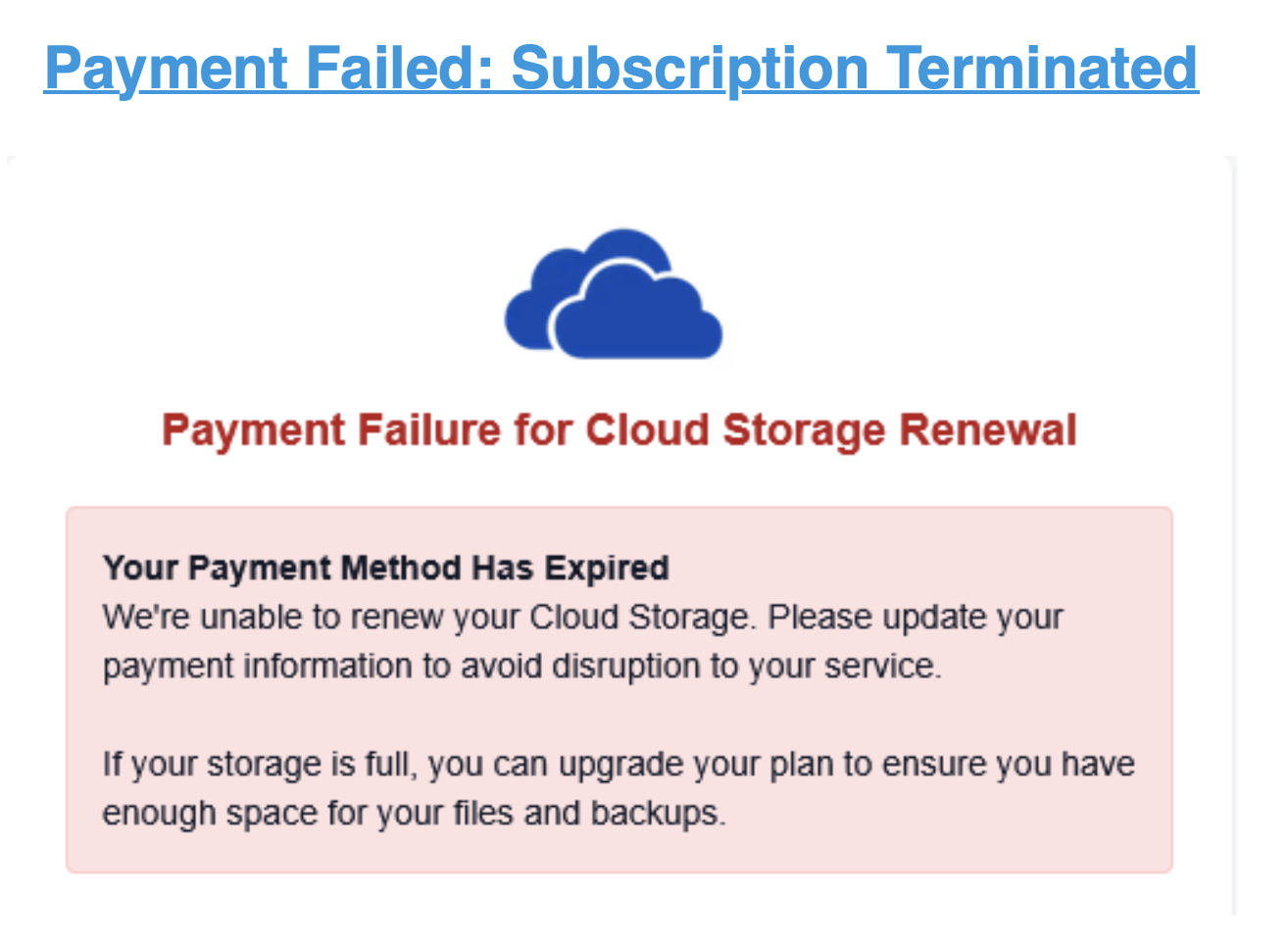
OK - we could probably stop right here.... yes, they subscribe to several cloud storage services, and yes, because they had updated their credit card, it's very possible that there was outdated credit card info that would get flagged by the various services set to make automatic payments with the old information.
But if any of those cloud storage services had sent an email, they would start off with their name: I know this user has an account with Microsoft's OneDrive, with Apple's iCloud, and with a Google Gmail account they also have Google Drive storage.
But 'Cloud Storage'? Is that the name of a cloud storage service? If your car dealer sends you an email saying it's time to make an appointment to bring your car in for service, I'd expect the email to have the name and logo of the brand of car - Toyota, Volkswagen, Ford - along with the name of the actual dealership. Not an email referring to 'Car Dealer'.
And 'Payment failed: Subscription Terminated'. While it sounds scary, that's not how it works in the real world. When I've had an automatic payment fail due to outdated credit card info, the services - which want my ongoing business - have sent me an email asking me to update my payment information, but in the meantime, they certainly haven't terminated my service.. (And if some service I relied on had been terminated, hopefully I would notice. Otherwise, maybe I don't really need that service!)
Already a fail. But wait - we skipped the top of the forwarded message.
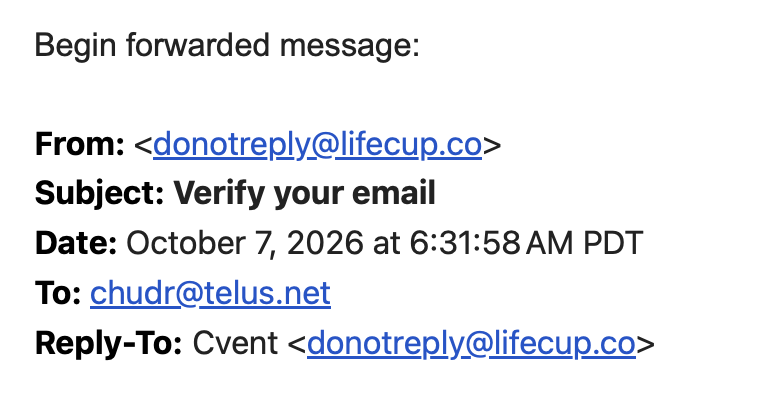
The email had a subject line of Verify your email - not update credit card information. And it apparently was sent from a domain named lifecup.co - is that a cloud service?
In my web browser, I went to lifecup.co - it seems to be a legitimate business:
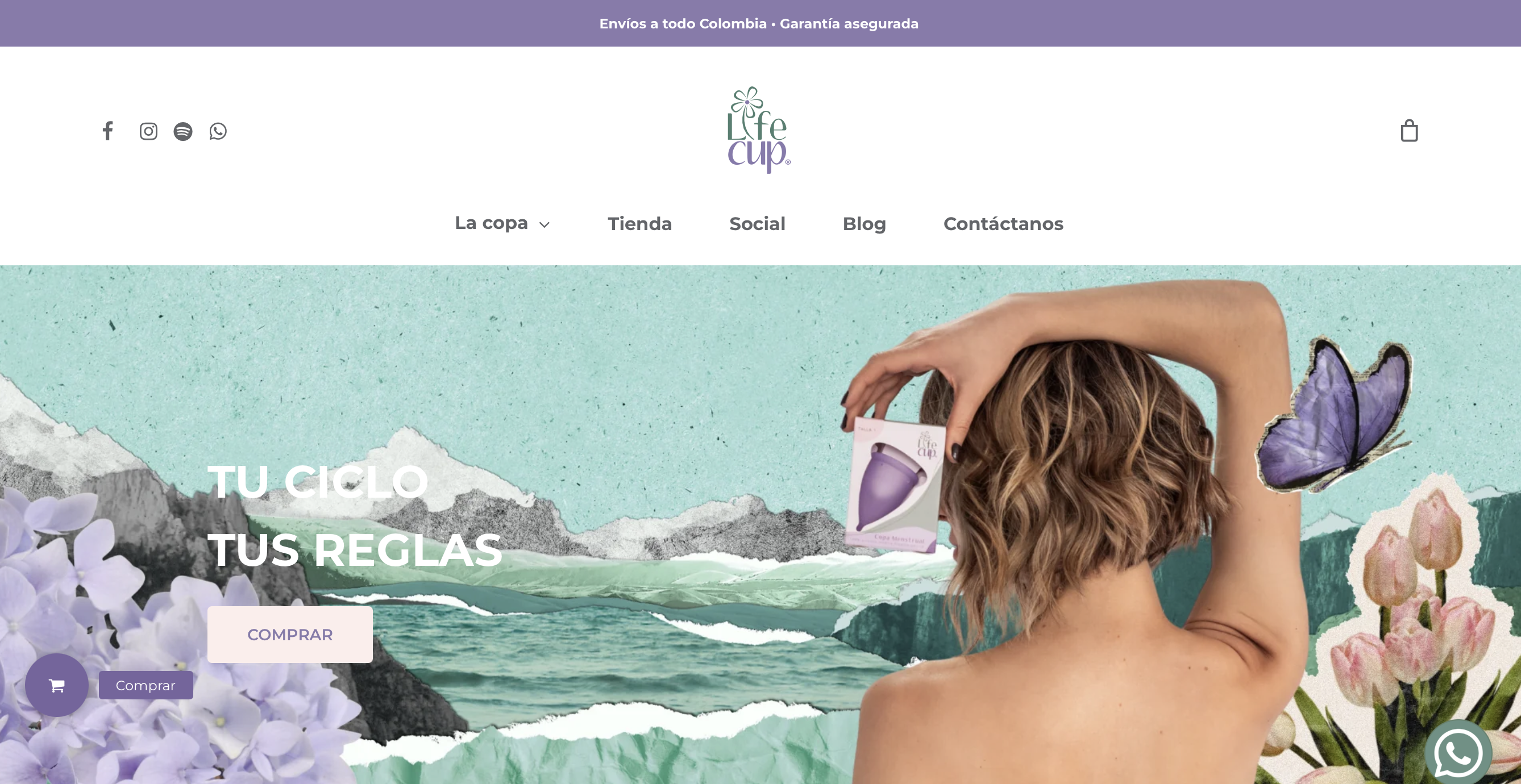
Not a cloud service. Lifecup.co is a Colombian business selling menstrual cups! Perhaps their email server has been hacked? Whatever - certainly not a company offering cloud storage services to Canadians!
Another fail. Let's scroll further down the forwarded email.
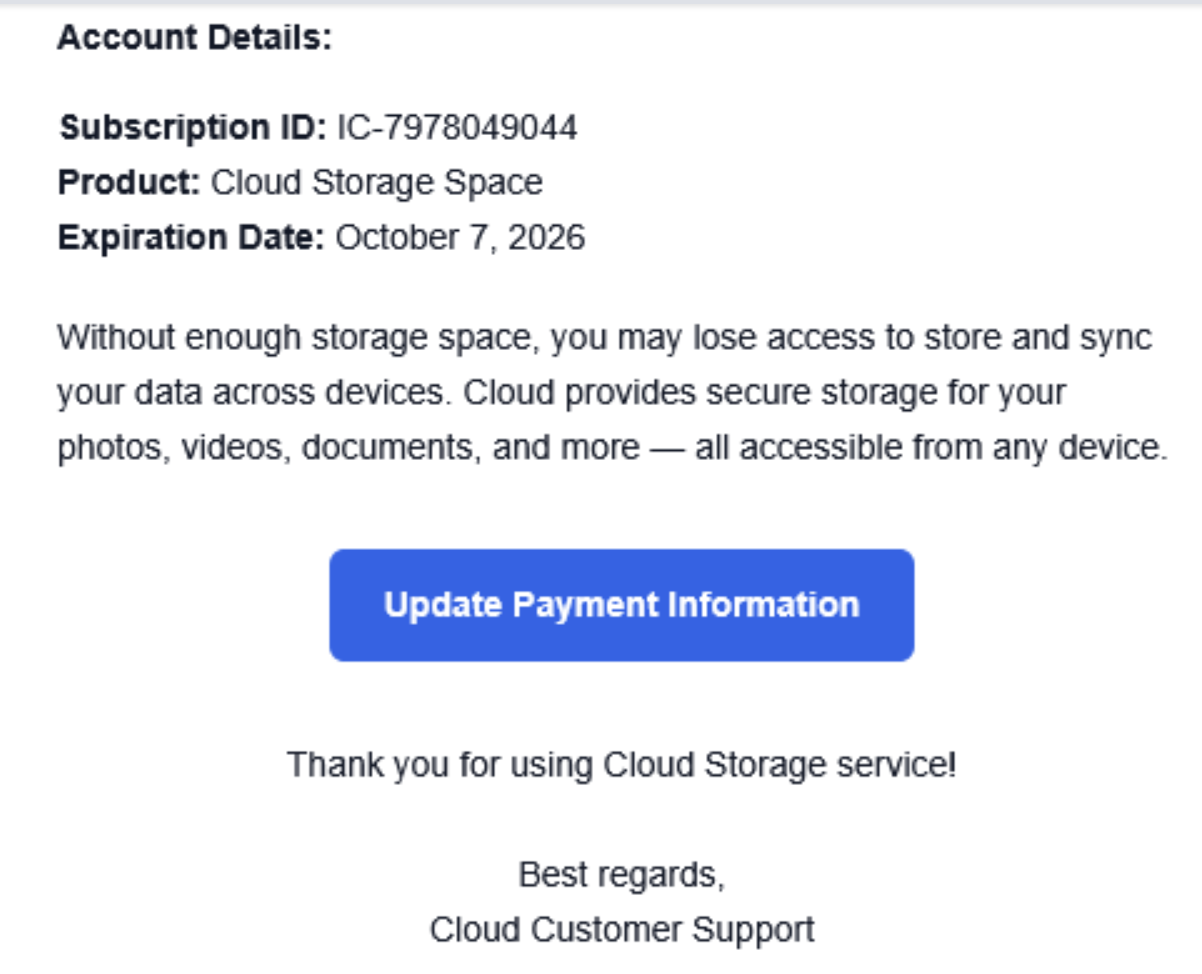
Aside from the seemingly bogus Cloud Storage name, this could look legitimate. Time to pull out my basic web browser forensic tool - if I hover my mouse or trackpad pointer over a button or link, small text appears at the bottom of my browser window showing where the link points.
(Note: this works best on a desktop or laptop computer, not a phone or tablet. And it might require fussing with the preferences or settings of your web browser. Try it and see if it works for you - it's a really useful - if a bit geeky - tool).
Here's what I saw with my pointer hovering over the blue button:
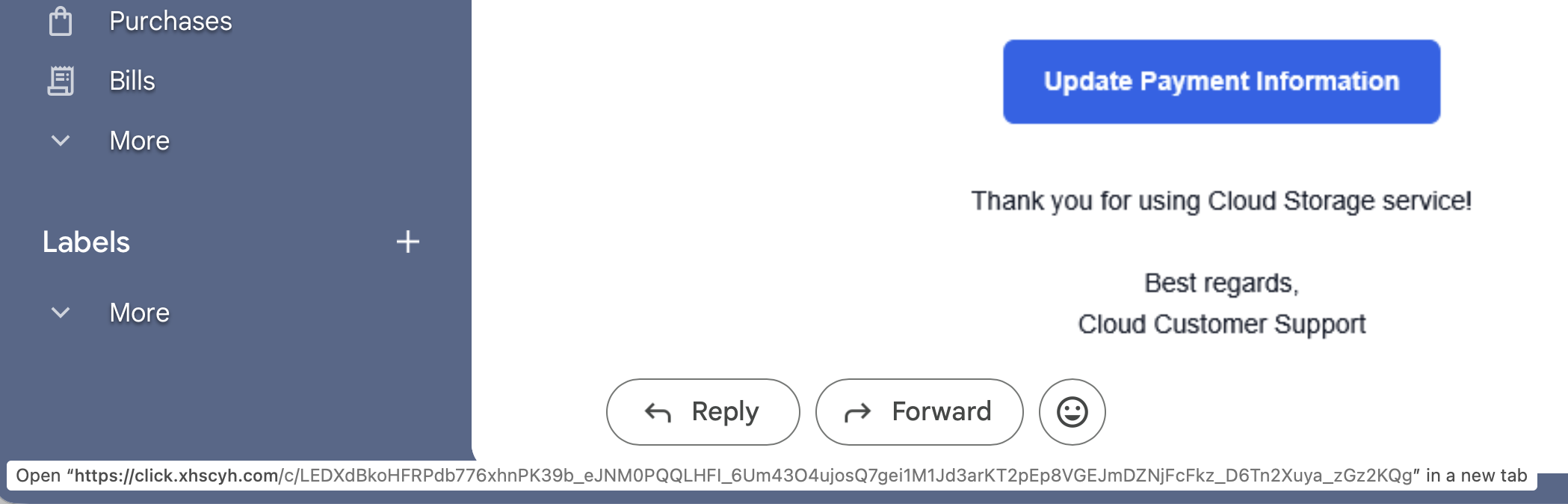
Notice the small text at the bottom? Too hard to read? How's this closeup?

Clicking on the button doesn't go to any place I recognize. Do you? Click.xhscyh.com?
Don't try this at home, boys and girls - but I clicked on the link. And got a security warning:
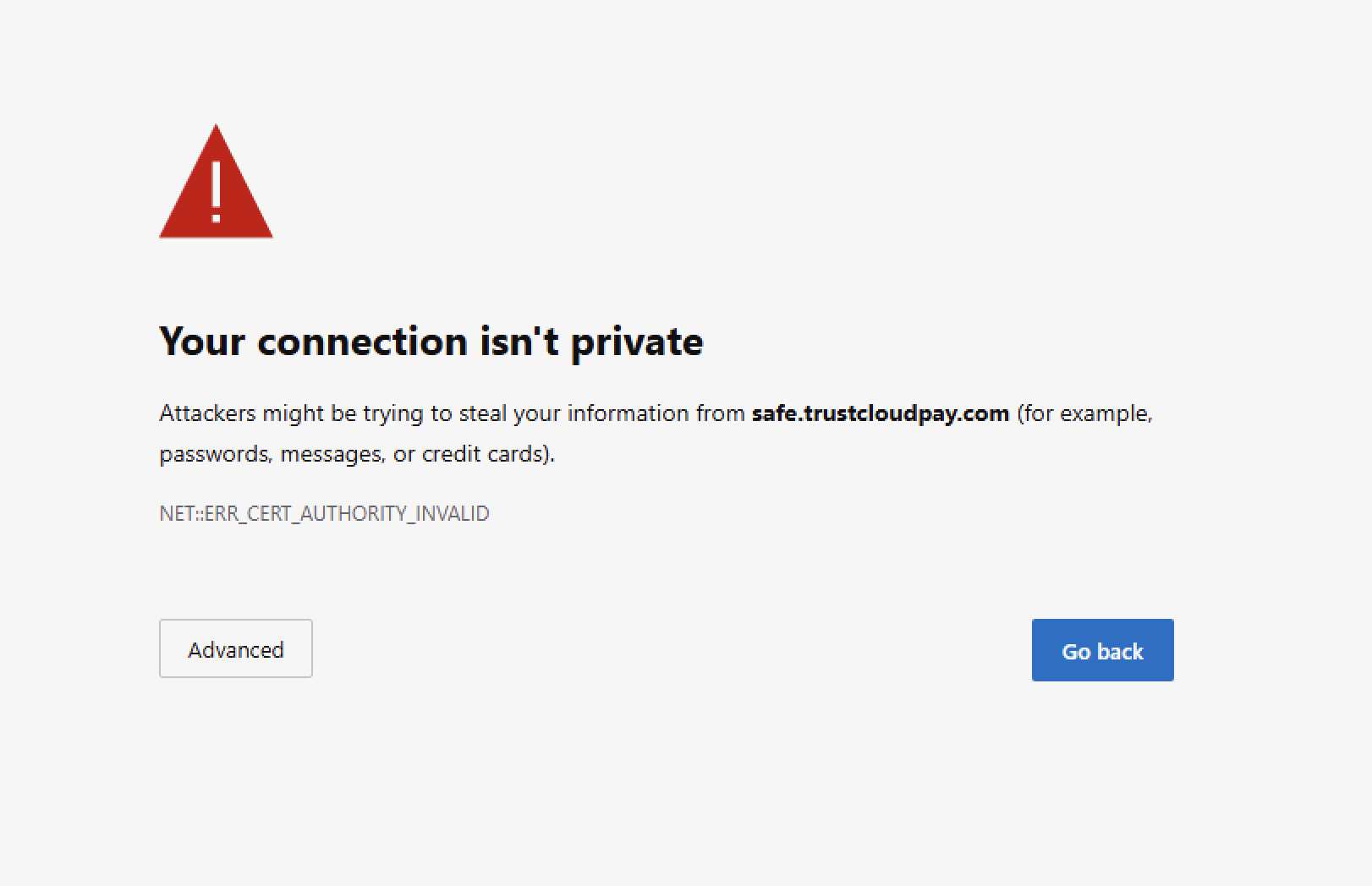
Because I take risks in order to help my readers, I clicked on Advanced and continued to the site. (Again, don't do this!)
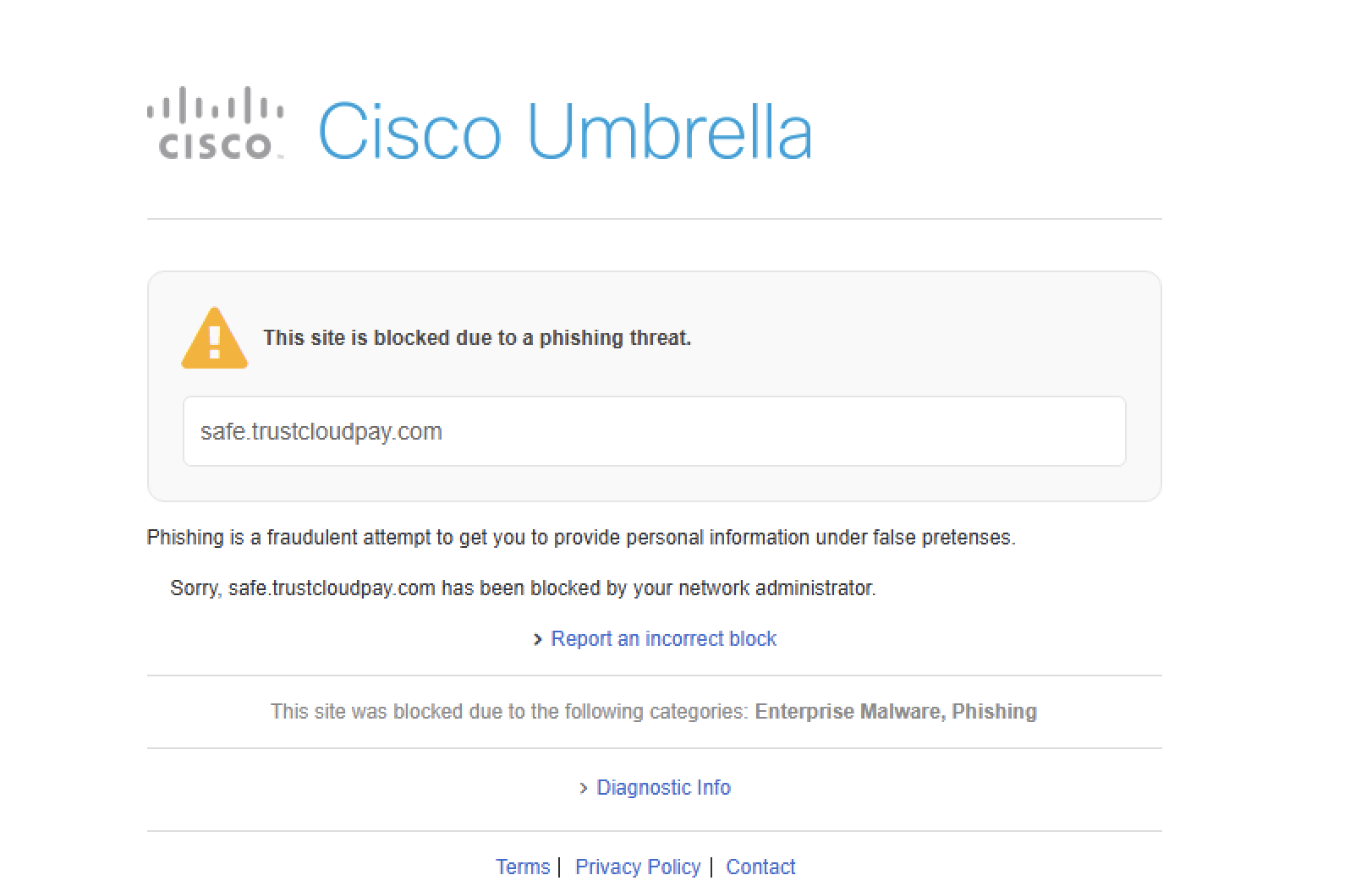
Again, my security software kept me from getting to the actual destination... I'll stop now. Hopefully, you're computer or devices would also keep you from going anyway this sketchy. But better not to go there in the first place.
So, in case you had any doubt, the forwarded email is clearly a fake scam trying to get an unsuspecting user to type in their credit card information.
But just for fun, let's continue scrolling down the email.
A bit further down, there's an unsubscribe link. Why would a warning that your cloud subscription is about to be terminated need an unsubscribe link? Hovering over it shows it goes to same scammy looking URL.
Lets keep scrolling.
There's a bunch of white space, and then something totally out of place:
What looks like a 2 Step Verification message with a 6 digit code apparently from a service named Cvent. Cvent is a real company '...that provides software-as-a-service for meetings, events, and hospitality management. Cvent also provides software for hotels and venues to manage group bookings, including corporate travel, and source new group business.' (Source: Wikipedia)
There are a couple of links - which appear to go to legitimate Cvent addresses.
What's that doing in this email? Frankly, it looks like sloppy editing by the scammer.
And that's the end.
Conclusions?
If you get unexpected emails asking for log in information, credit card information, or more, stop before you click - and certainly stop before you enter any information. Ask a few questions:
-- is this a company you actually have an ongoing business relationship with? If so, contact them separately - not by replying to what might be a questionable email. Did they send this email?
-- look at the reply-to info at the top of the email (though this can be spoofed) - is this an address that looks like the company you're doing business with? In this case, while the email claimed to be from a (perhaps sketchy) cloud storage service, the reply-to email address was from a Colombian company selling menstrual cups.
-- hover your pointer over any links or buttons and look at the URL that appears in small letters showing where the link or button actually goes. Does that look like anything you might expect?
-- trust your paranoia.
There's a long-time idea that you can identify scam emails by the spelling mistakes. That's not necessarily the case. Did you see any obvious spelling or grammar mistakes in this email? I didn't notice any. The large chunks of white space under the opening portion of the email - and the Cvent 2 Step Verification code were odd and poor design - but most users wouldn't scroll down that far. And there were lots of clues that the message was fake even if it didn't have those design errors. Don't count on seeing spelling errors or poor design to keep you safe.
My security software protected me from going to the scammers' web page wanting me to enter my credit card info. Yours may not. Mine may not protect me next time.
If you think the message is fake, you could just delete it. Better, though, will be to mark it as spam. Marking it as spam lets your email system know to treat future messages like this as spam - both for you and potentially for others who might be receiving them.
Older blog postings....
Real or Scam? Let's take a look
By Alan Zisman © 2026-10-08
Yesterday morning I got an email from a person I know - they were forwarding an email that had them puzzled. Real or scam? they asked. They said they hadn't clicked to update their payment information but had recently updated their credit card.
Here's what I saw - or at least the top of what proved to be a very long email message:
OK - we could probably stop right here.... yes, they subscribe to several cloud storage services, and yes, because they had updated their credit card, it's very possible that there was outdated credit card info that would get flagged by the various services set to make automatic payments with the old information.
But if any of those cloud storage services had sent an email, they would start off with their name: I know this user has an account with Microsoft's OneDrive, with Apple's iCloud, and with a Google Gmail account they also have Google Drive storage.
But 'Cloud Storage'? Is that the name of a cloud storage service? If your car dealer sends you an email saying it's time to make an appointment to bring your car in for service, I'd expect the email to have the name and logo of the brand of car - Toyota, Volkswagen, Ford - along with the name of the actual dealership. Not an email referring to 'Car Dealer'.
And 'Payment failed: Subscription Terminated'. While it sounds scary, that's not how it works in the real world. When I've had an automatic payment fail due to outdated credit card info, the services - which want my ongoing business - have sent me an email asking me to update my payment information, but in the meantime, they certainly haven't terminated my service.. (And if some service I relied on had been terminated, hopefully I would notice. Otherwise, maybe I don't really need that service!)
Already a fail. But wait - we skipped the top of the forwarded message.
The email had a subject line of Verify your email - not update credit card information. And it apparently was sent from a domain named lifecup.co - is that a cloud service?
In my web browser, I went to lifecup.co - it seems to be a legitimate business:
Not a cloud service. Lifecup.co is a Colombian business selling menstrual cups! Perhaps their email server has been hacked? Whatever - certainly not a company offering cloud storage services to Canadians!
Another fail. Let's scroll further down the forwarded email.
Aside from the seemingly bogus Cloud Storage name, this could look legitimate. Time to pull out my basic web browser forensic tool - if I hover my mouse or trackpad pointer over a button or link, small text appears at the bottom of my browser window showing where the link points.
(Note: this works best on a desktop or laptop computer, not a phone or tablet. And it might require fussing with the preferences or settings of your web browser. Try it and see if it works for you - it's a really useful - if a bit geeky - tool).
Here's what I saw with my pointer hovering over the blue button:
Notice the small text at the bottom? Too hard to read? How's this closeup?
Clicking on the button doesn't go to any place I recognize. Do you? Click.xhscyh.com?
Don't try this at home, boys and girls - but I clicked on the link. And got a security warning:
Because I take risks in order to help my readers, I clicked on Advanced and continued to the site. (Again, don't do this!)
Again, my security software kept me from getting to the actual destination... I'll stop now. Hopefully, you're computer or devices would also keep you from going anyway this sketchy. But better not to go there in the first place.
So, in case you had any doubt, the forwarded email is clearly a fake scam trying to get an unsuspecting user to type in their credit card information.
But just for fun, let's continue scrolling down the email.
A bit further down, there's an unsubscribe link. Why would a warning that your cloud subscription is about to be terminated need an unsubscribe link? Hovering over it shows it goes to same scammy looking URL.
Lets keep scrolling.
There's a bunch of white space, and then something totally out of place:
What looks like a 2 Step Verification message with a 6 digit code apparently from a service named Cvent. Cvent is a real company '...that provides software-as-a-service for meetings, events, and hospitality management. Cvent also provides software for hotels and venues to manage group bookings, including corporate travel, and source new group business.' (Source: Wikipedia)
There are a couple of links - which appear to go to legitimate Cvent addresses.
What's that doing in this email? Frankly, it looks like sloppy editing by the scammer.
And that's the end.
Conclusions?
If you get unexpected emails asking for log in information, credit card information, or more, stop before you click - and certainly stop before you enter any information. Ask a few questions:
-- is this a company you actually have an ongoing business relationship with? If so, contact them separately - not by replying to what might be a questionable email. Did they send this email?
-- look at the reply-to info at the top of the email (though this can be spoofed) - is this an address that looks like the company you're doing business with? In this case, while the email claimed to be from a (perhaps sketchy) cloud storage service, the reply-to email address was from a Colombian company selling menstrual cups.
-- hover your pointer over any links or buttons and look at the URL that appears in small letters showing where the link or button actually goes. Does that look like anything you might expect?
-- trust your paranoia.
There's a long-time idea that you can identify scam emails by the spelling mistakes. That's not necessarily the case. Did you see any obvious spelling or grammar mistakes in this email? I didn't notice any. The large chunks of white space under the opening portion of the email - and the Cvent 2 Step Verification code were odd and poor design - but most users wouldn't scroll down that far. And there were lots of clues that the message was fake even if it didn't have those design errors. Don't count on seeing spelling errors or poor design to keep you safe.
My security software protected me from going to the scammers' web page wanting me to enter my credit card info. Yours may not. Mine may not protect me next time.
If you think the message is fake, you could just delete it. Better, though, will be to mark it as spam. Marking it as spam lets your email system know to treat future messages like this as spam - both for you and potentially for others who might be receiving them.
Older blog postings....
| About This Blog... I've been writing about computers, software, Internet and the rest of technology since 1992, including a 17 year (1995-2012) stint as 'High Tech Office' columnist for Business in Vancouver. This blog includes thoughts on technology, society, and anything else that might interest me. Comments, emailed to alan@zisman.ca are welcome - and may be published in whole or part. You can follow me on Facebook for notice of new blog postings. |
 |